
Studio d’images principales de produits B2B
Studio d’images principales de produits B2B
Préparez des images sur fond blanc, d’application, de détail, de points forts, de qualité et d’usine, tout en plaçant le véritable produit — et non un substitut inventé — au centre de chaque résultat.
Le problème métier
Les photos de produits génériques rendent les bons produits plus difficiles à comprendre et à faire confiance
De nombreuses équipes export disposent d’une photo de produit exploitable, mais pas de l’ensemble complet d’images que les acheteurs attendent sur les marketplaces, dans les catalogues, les sites web, les devis et le suivi commercial. Les nouvelles prises de vue traditionnelles prennent du temps, tandis que la génération d’images génériques peut modifier le produit lui-même. Le Studio d’image principale produit B2B planifie chaque image autour du véritable produit importé et de l’objectif commercial que vous sélectionnez.
Le problème métier
Une seule photo ne peut pas expliquer chaque utilisation
Une image sur fond blanc identifie le produit, mais elle ne montre pas nécessairement l’installation, l’échelle, les détails fonctionnels ou un contexte d’utilisation crédible.
L’impact concret
Les prises de vue répétées ralentissent les ventes
Chaque nouvelle marketplace, chaque catalogue, campagne ou demande d’acheteur peut entraîner un nouveau cycle de prise de vue, de retouche, de validation et de livraison de fichiers.
Avant et après
Passez d’une photo isolée à un ensemble d’images B2B conçu pour un objectif précis
Remplacez les tâches manuelles répétitives par un processus plus clair qui relie l’objectif commercial, les informations de travail et la prochaine action.
Avant
Avant le Studio d’image principale
Réutilisez la même photo de produit simple sur chaque canal. Donnez séparément des briefs aux photographes ou aux designers pour chaque besoin d’image. Attendez de nombreuses révisions avant que les ventes puissent utiliser les images. Risquez de recevoir des visuels attrayants qui ne correspondent plus au produit.
Avec le Studio d’image principale produit B2B
Avec le Studio d’image principale
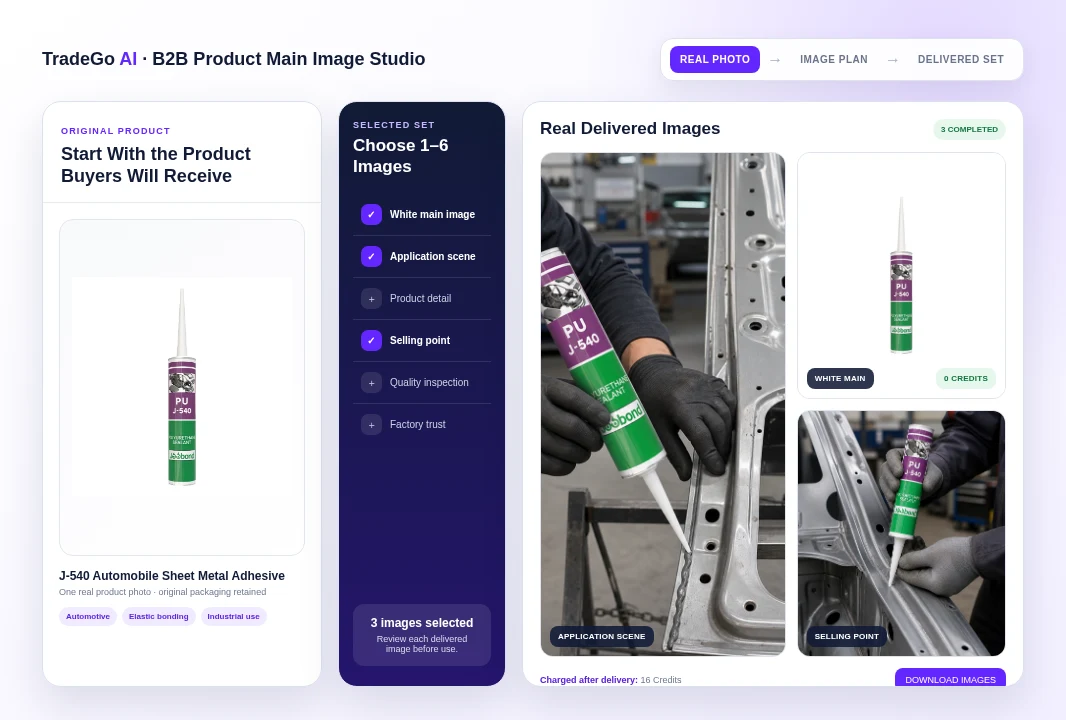
Commencez avec la véritable photo du produit, son nom et les points forts approuvés. Choisissez exactement la combinaison de 1 à 6 images destinées aux acheteurs dont vous avez besoin. Examinez chaque image livrée et téléchargez uniquement les résultats exploitables. Régénérez une image sélectionnée ou poursuivez sa modification si nécessaire.
Résultat commercial
Les images créatives peuvent modifier le produit
Lorsque le texte de l’emballage, les interfaces, la quantité, les matériaux ou la structure sont modifiés, une image attrayante peut devenir inutilisable ou trompeuse.
Résultat réel de la plateforme
Créez différentes images destinées aux acheteurs à partir du même véritable produit
Le visuel principal ci-dessus utilise une véritable photo d’un mastic J-540 et trois images réellement livrées par la plateforme : une image principale standard sur fond blanc, une scène d’application et une image mettant en avant un point fort.
Comment ça fonctionne
Quatre étapes pour passer d’une véritable photo de produit à des images commerciales téléchargeables
Suivez une séquence claire, depuis les informations fournies par votre équipe jusqu’à un résultat pouvant être examiné et utilisé pour la prochaine action commerciale.
Étape 1
Importez le véritable produit
Ajoutez une image claire au format JPG, PNG ou WebP, le nom du produit et un point fort approuvé par ligne.
Étape 2
Choisissez l’ensemble d’images
Sélectionnez les quantités pour six types d’images, avec un total de 1 à 6 images pour le projet.
Étape 3
Examinez les images livrées
Vérifiez le produit, l’emballage, la scène, les détails et les points forts fournis dans chaque image terminée.
Étape 4
Téléchargez ou affinez
Téléchargez les images terminées, régénérez un résultat sélectionné ou ouvrez sa toile pour effectuer d’autres modifications prises en charge.
Ce que vous utilisez
Construisez l’ensemble autour de la question de l’acheteur à laquelle chaque image doit répondre
Utilisez les informations commerciales dont votre équipe dispose déjà, puis examinez le résultat avant de l’intégrer à des activités liées aux clients, aux marchés, aux documents ou aux campagnes.
01
Image principale sur fond blanc
Présentez le produit inchangé, dans des proportions correctes, sur une toile carrée blanche et épurée.
02
Scène d’application
Montrez une utilisation, une installation ou une relation de fonctionnement crédible impliquant le véritable produit.
03
Détail du produit
Mettez l’accent sur un détail pertinent du matériau, de la structure, de l’interface, de l’extrémité fonctionnelle ou de l’application.
04
Image mettant en avant un point fort
Exprimez uniquement les points forts fournis par votre équipe au moyen de preuves visuelles crédibles.
Avant de commencer
Ce que le Studio d’image principale produit B2B vous aide à faire et les points qui nécessitent encore une vérification
Utilisez l’espace de travail pour organiser et préparer le travail, tout en laissant le jugement commercial final et les approbations importantes à votre équipe.
À qui s’adresse cet outil
Créez des images de produits B2B plus utiles avec moins de travail de production
Planifiez un ensemble d’images mixtes à partir d’une seule véritable photo de produit. Créez des images d’annonce épurées et des scènes d’utilisation professionnelle crédibles. Reliez chaque image à un objectif défini destiné aux acheteurs. Suivez l’état du projet, les images livrées et les Crédits déduits. Téléchargez, régénérez ou affinez les images terminées prises en charge.
Point important
Chaque image nécessite toujours une vérification du produit
Le studio est conçu pour préserver le véritable produit, mais les images générées peuvent encore contenir des erreurs. Vérifiez le texte de l’emballage, les logos, les interfaces, les matériaux, les dimensions, la quantité, les ombres, les relations physiques, les détails de l’arrière-plan et chaque affirmation visible. Ne considérez pas une scène d’inspection, d’usine, de certification, de performance ou d’application générée comme une preuve factuelle, sauf si elle reflète fidèlement votre véritable produit et vos opérations.
Questions fréquentes
Des questions avant de créer votre premier ensemble d’images de produits B2B
Le Studio d’image principale produit B2B s’adresse aux équipes commerciales export, produit et marketing qui disposent d’une véritable photo de produit et ont besoin d’images plus utiles destinées aux acheteurs, sans répéter un cycle complet de production photo.
Commencez par le véritable produit
Créez les images dont vos acheteurs ont besoin pour le comprendre
Importez une photo claire du produit, choisissez exactement la combinaison d’images souhaitée et examinez chaque résultat livré avant de l’utiliser dans un catalogue, un site web, un devis, une marketplace ou une conversation commerciale. L’image principale sur fond blanc coûte actuellement 0 Crédit ; les autres images livrées coûtent 8 Crédits chacune.
Choisissez votre prochaine étape
Commencez par une tâche réelle
Ouvrez l’espace de travail dès maintenant ou comparez les forfaits avant de commencer.