
Extension de mise en forme des produits WooCommerce
Extension de mise en forme des produits WooCommerce
Installez le plugin WordPress, analysez votre catalogue WooCommerce et transformez les descriptions existantes incohérentes en pages produit plus claires, sans devoir les recréer manuellement.
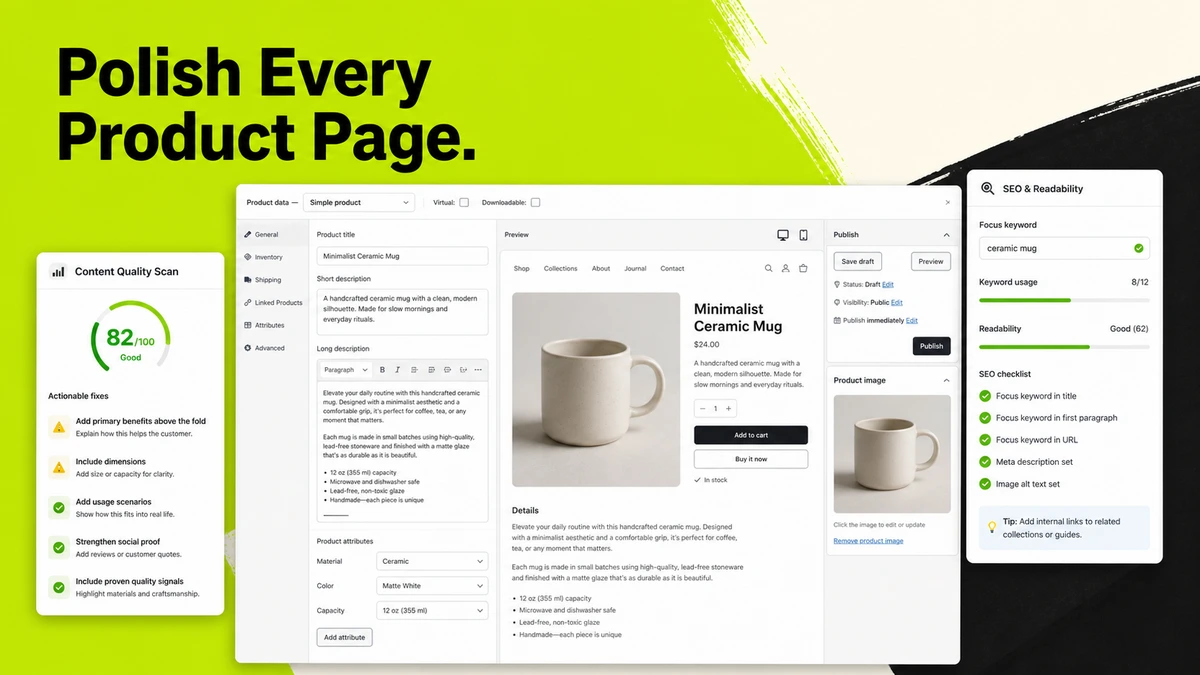
Pourquoi utiliser le plugin WooCommerce Product Formatter
Améliorez vos pages produit sans réécrire tout le catalogue
À mesure qu’un catalogue WooCommerce s’agrandit, les descriptions produit deviennent souvent incohérentes. Les spécifications, arguments de vente, titres, descriptions courtes et réponses aux questions finissent par être présentés différemment d’un produit à l’autre.
Le problème métier
Le nettoyage manuel ne passe pas à l’échelle d’un catalogue
Les équipes passent des heures à ouvrir les produits un par un, à recréer la même structure de contenu, à vérifier qu’aucune information importante n’a été perdue et à recommencer chaque fois qu’un nouveau lot de produits doit être traité.
Le changement
Analysez d’abord, puis améliorez uniquement les pages qui en ont besoin
Le plugin analyse gratuitement les produits WooCommerce, permet à votre équipe de sélectionner les pages qui en valent la peine, prévisualise un résultat structuré et applique ou annule les modifications approuvées depuis le flux de travail produit.
Ce que le plugin WooCommerce Product Formatter vous aide à faire
Transformez les informations produit existantes en pages boutique cohérentes
Conservez les informations déjà présentes dans WooCommerce tout en améliorant l’organisation des descriptions, spécifications, descriptions courtes et réponses aux questions pour les clients.
Analyser
Trouvez les pages produit qui nécessitent une intervention
Lancez une analyse gratuite du catalogue pour identifier les produits dont le contenu est faible, incomplet ou incohérent avant de dépenser des crédits en mise en forme.
Format
Restructurez les descriptions produit existantes
Choisissez un profil de page produit adapté et organisez le contenu actuel en titres, arguments de vente, spécifications et descriptions courtes facultatives plus clairs.
Publier
Prévisualisez, appliquez ou annulez le résultat
Examinez la version mise en forme dans WooCommerce, appliquez-la au produit uniquement lorsque vous êtes prêt, et restaurez le contenu d’origine lorsqu’une modification appliquée doit être annulée.
Exemple de flux de travail
D’un catalogue incohérent à des pages produit plus claires
Cet exemple montre comment un fabricant peut analyser un catalogue WooCommerce, sélectionner les produits qui en valent la peine, examiner des descriptions structurées et appliquer les modifications approuvées par lots.
Examinez 80 pages produit industrielles
Installez et associez le plugin, puis analysez la boutique pour voir quelles descriptions produit nécessitent des titres, spécifications, arguments de vente ou descriptions courtes plus clairs.
Traitez les produits qui méritent d’être améliorés
Sélectionnez les produits concernés, choisissez le profil industriel B2B et les paramètres de présentation, puis préparez des aperçus mis en forme à partir des informations déjà enregistrées dans WooCommerce.
Appliquez des pages cohérentes sans perdre les originaux
Examinez chaque résultat, appliquez les descriptions approuvées, suivez le lot et utilisez l’annulation lorsqu’une version antérieure doit être restaurée.
Poursuivre avec Studio d’images principales de produits B2B, créez des supports commerciaux avec Générateur de catalogues produits, ou comparez les forfaits et crédits disponibles.
Flux de travail de mise en forme des produits WooCommerce
Travaillez directement depuis vos écrans produit WooCommerce
Installez le plugin une seule fois, associez la boutique à votre équipe TradeGo AI et gérez l’analyse, la mise en forme, les aperçus, l’application et l’annulation depuis le flux de travail produit familier de WordPress.
- Analysez les produits sans dépenser de crédits de mise en forme avant de choisir les pages à améliorer.
- Protégez les images, shortcodes, liens, chiffres et affirmations produit existants tout en restructurant la page.
- Traitez un produit ou un lot sélectionné, puis consultez le statut et l’historique de mise en forme dans TradeGo AI.
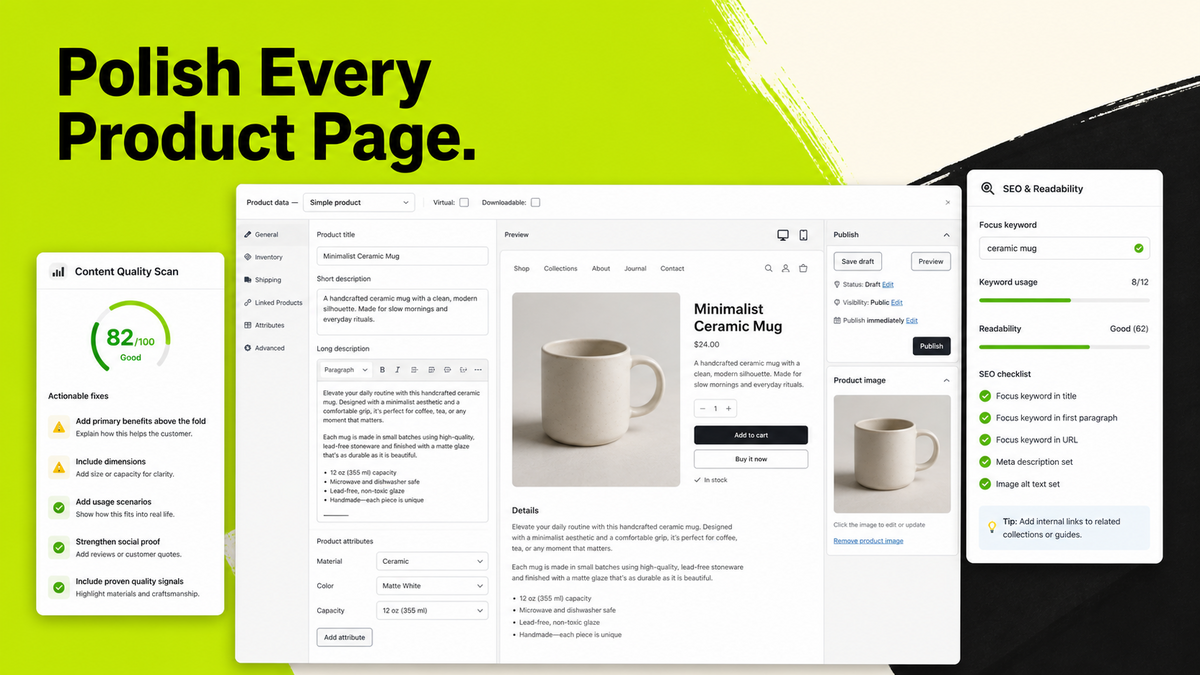
Comment fonctionne le plugin WooCommerce Product Formatter
Un parcours clair, de la connexion de la boutique à la publication du contenu produit
Le plugin et TradeGo AI restent connectés tout au long du flux de travail, afin que votre équipe puisse examiner le contenu produit avant toute modification et conserver un historique de chaque tâche.
Étape 1
Installez et associez la boutique
Téléchargez le plugin WordPress, activez-le et connectez la boutique WooCommerce avec un code d’association à usage unique.
Étape 2
Analysez gratuitement le catalogue
Examinez la qualité du contenu produit par petits lots et décidez quelles pages méritent d’être mises en forme.
Étape 3
Prévisualisez et appliquez les résultats sélectionnés
Mettez en forme un produit ou un lot, vérifiez la page préparée et appliquez uniquement les versions approuvées par votre équipe.
Étape 4
Suivez les tâches et restaurez si nécessaire
Consultez l’historique individuel et par lot, résolvez les tâches incomplètes et annulez un résultat appliqué lorsque le contenu d’origine doit être restauré.
Le résultat réutilisable
Conservez un système de pages produit cohérent dans toute la boutique
Votre équipe peut réutiliser les mêmes choix de profil produit, d’espacement, de titres, de tableaux de spécifications et de rayon des angles lors de chaque nouvelle tâche de mise en forme, au lieu de recréer le style de page à chaque fois.
Avant de commencer
À qui s’adresse le plugin et ce qu’il n’inventera pas
Utilisez le module de mise en forme pour améliorer la structure des informations produit WooCommerce existantes, tout en conservant à votre équipe l’approbation finale concernant les produits, le SEO, les aspects juridiques et la publication.
À qui s’adresse cet outil
Conçu pour les boutiques WooCommerce dont le catalogue s’agrandit
Le plugin WooCommerce Product Formatter est conçu pour les fabricants, exportateurs, vendeurs B2B, équipes e-commerce et agences qui ont besoin d’une méthode plus cohérente pour gérer de nombreuses pages produit.
Point important
La mise en forme utilise les informations déjà présentes dans le produit
Le module de mise en forme ne crée pas de spécifications, certifications, prix, liens ou affirmations à risque manquants. Lorsque la collaboration SEO est utilisée, elle fonctionne uniquement avec les mots-clés principaux déjà enregistrés dans Yoast SEO, Rank Math ou AIOSEO.
Questions fréquentes
Des questions avant de connecter le plugin WooCommerce Product Formatter
Des réponses directes sur l’installation, les analyses gratuites, le contenu existant, la mise en forme par lots, la collaboration SEO, les aperçus, l’application des modifications et l’annulation.
Prêt à commencer
Connectez une boutique WooCommerce et analysez le catalogue
Commencez par la boutique où les descriptions produit incohérentes demandent le plus de temps à gérer.
Commencer dans l’espace de travail
Téléchargez le plugin et associez votre boutique
Ouvrez l’espace de travail WooCommerce Product Formatter Plugin, téléchargez le fichier ZIP WordPress, créez un code d’association à usage unique et connectez la boutique.
Vous souhaitez d’abord comparer les accès ?