
TradePilot
TradePilot
TradePilot organisiert Zolldaten, bestehende Lead-Listen, Käufergespräche und Nachfassaufgaben, damit internationale Vertriebsteams wissen, welche potenziellen Kunden Aufmerksamkeit benötigen und was als Nächstes zu tun ist.
Warum TradePilot
Wissen, welche potenziellen Käufer heute Aufmerksamkeit benötigen
Käuferdaten stammen häufig aus Zolldaten, Messen, Verzeichnissen, Empfehlungen, Tabellen, E-Mails und WhatsApp. Die Informationen sind vorhanden, aber Vertriebsteams haben dennoch Schwierigkeiten zu erkennen, wen sich zu kontaktieren lohnt, was fehlt und welches Follow-up als Nächstes erfolgen sollte.
Das Geschäftsproblem
Leaddaten sagen dem Vertrieb nicht, was zu tun ist
Ein Firmenname oder ein Kontaktdatensatz ist noch kein Vertriebsplan. Ohne Quellenbelege, Kontaktstatus, Käufersignale und eine klare nächste Aktion bleiben vielversprechende Kundenkonten unbearbeitet oder erhalten eine allgemeine Ansprache.
Die Veränderung
Datensätze und Antworten in eine tägliche Aufgabenliste verwandeln
TradePilot führt Quelldatensätze, Käuferdetails, Kommunikationsverlauf, fehlende Informationen und Follow-up-Prioritäten in einem einzigen Arbeitsbereich für die Vertriebsentwicklung zusammen.
Wobei TradePilot Sie unterstützt
Von vorhandenen Leaddaten zu konsequentem Vertriebs-Follow-up
Beginnen Sie mit Zolldaten, einer bestehenden Käuferliste oder einem echten Kundengespräch. TradePilot organisiert die Informationen rund um jeden potenziellen Kunden und zeigt die nächste Vertriebsaktion an.
Organisieren
Nutzbare Käuferkonten erstellen
Importieren Sie Zolldatensätze oder bestehende Lead-Listen, bewahren Sie die Quellenbelege auf, führen Sie wiederholte Datensätze zusammen und ermitteln Sie fehlende Unternehmens- oder Kontaktdaten.
Priorisieren
Käufer mit Handlungsbedarf fokussieren
Trennen Sie Kundenkonten, bei denen weitere Informationen benötigt werden, von denen, die für die erste Kontaktaufnahme, die Bearbeitung von Antworten, das Follow-up oder die Übergabe an das CRM bereit sind.
Vorantreiben
Jede nächste Aktion weiterführen
Halten Sie Kontaktaufnahme, Antworten, Käuferanforderungen, Follow-up-Termine und den Übergabestatus mit demselben potenziellen Kunden verknüpft.
Beispiel-Workflow
Vom Käuferdatensatz zur qualifizierten Vertriebsübergabe
Dieses Beispiel zeigt, wie ein bestehender Lead zu einem Käuferkonto mit Quellenbelegen, einer klaren Priorität und einem praktikablen nächsten Schritt wird.
01 · Ihre Quelle
Bereits vorhandene Käufer importieren
Importieren Sie Zolldatensätze oder eine bestehende Lead-Datei mit den derzeit verfügbaren Angaben zu Unternehmen, Markt, Produkt, Kontakt und Quelle.
02 · TradePilot-Arbeit
Datensätze abgleichen und Käuferprofile erstellen
TradePilot bewahrt Quellenbelege auf, gleicht zuverlässige Identifikatoren ab, hebt fehlende Informationen hervor und organisiert das Konto für das Vertriebs-Follow-up.
03 · Ihre Vertriebsaktion
Die Prioritätenliste bearbeiten und qualifiziertes Interesse übergeben
Kontaktieren Sie die richtigen Kundenkonten, prüfen Sie echte Antworten, planen Sie Follow-ups und überführen Sie qualifiziertes Interesse in CRM, Angebot oder PI-Vorbereitung, ohne den Datensatz neu erstellen zu müssen.
Weiter mit Lead-Qualifizierung, prüfen Sie einen potenziellen Vertrag mit TradeShield, oder vergleichen Sie die verfügbaren Pläne und Credits.
Echter TradePilot-Arbeitsbereich
Mit den heutigen Käuferprioritäten arbeiten
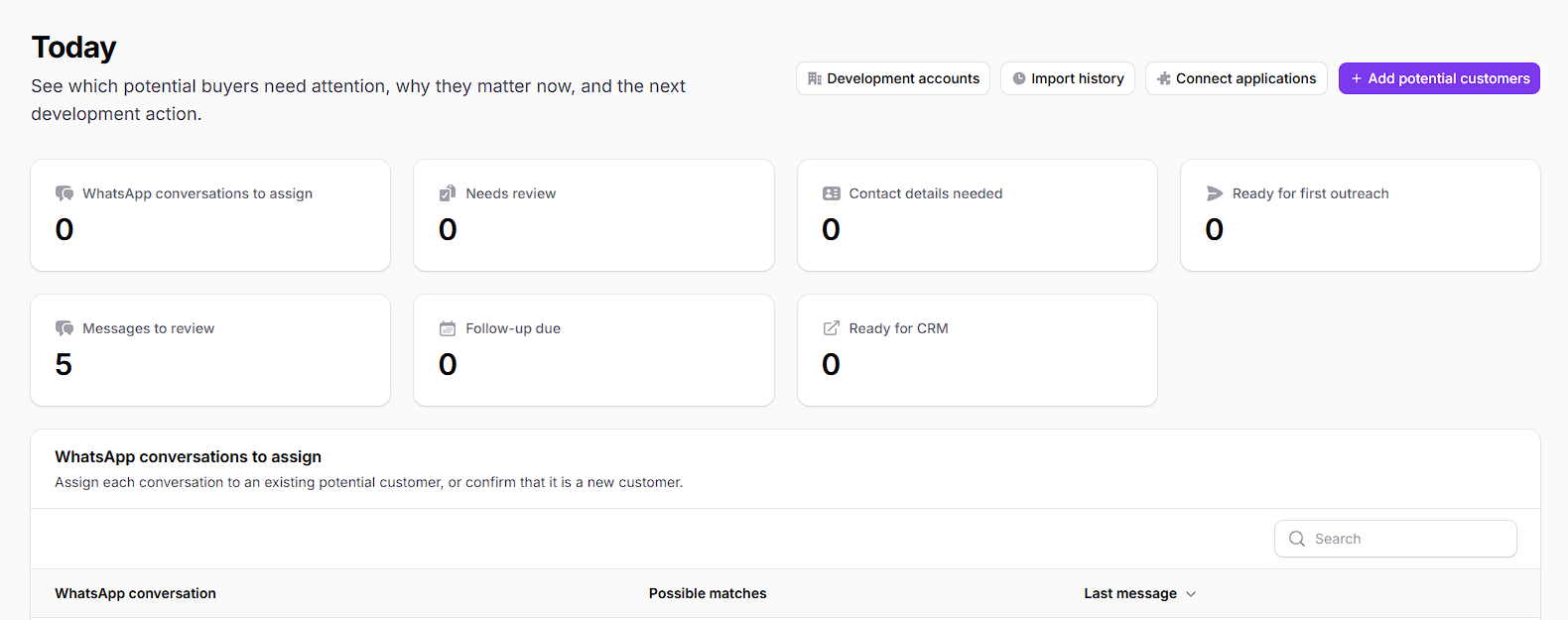
Der Arbeitsbereich „Heute“ zeigt, bei welchen Käuferkonten Kontaktdaten, eine Prüfung, die erste Kontaktaufnahme, die Bearbeitung von Antworten, ein Follow-up oder eine CRM-Übergabe erforderlich sind. Öffnen Sie ein Konto, um Quelle, Käuferprofil, Kommunikation und nächste Aktion gemeinsam zu sehen.
- Importieren Sie Zolldaten oder eine bestehende Lead-Liste, ohne die ursprünglichen Quellenbelege zu verlieren.
- Prüfen Sie Käuferdetails, Datenlücken, Kommunikationsverlauf und Vertriebspriorität in einem einzigen Konto.
- Überführen Sie qualifiziertes Interesse in CRM, Angebot, PI oder die nächste bestätigte Follow-up-Aktion.
So funktioniert TradePilot
Ein klarer Weg von der Lead-Quelle zur Vertriebsaktion
Jedes Käuferkonto enthält Quelle, verfügbare Fakten, Kommunikation, Status und nächste Aktion zusammen, damit das Team ohne erneute Erstellung des Datensatzes fortfahren kann.
Schritt 1
Bestehende Leads importieren
Beginnen Sie mit Zolldaten, einer bestehenden Lead-Liste oder einem Käufergespräch, über das Ihr Team bereits verfügt.
Schritt 2
Das Käuferprofil erstellen
Gleichen Sie zuverlässige Identifikatoren ab, bewahren Sie Quelldatensätze auf und ermitteln Sie nützliche Fakten, fehlende Angaben und Widersprüche.
Schritt 3
Die nächste Aktion bearbeiten
Bereiten Sie die erste Kontaktaufnahme vor, prüfen Sie eine Antwort, planen Sie ein Follow-up oder klären Sie, welche Informationen noch benötigt werden.
Schritt 4
Qualifiziertes Interesse übergeben
Überführen Sie einen kaufbereiten Käufer in das CRM, die Angebotserstellung, die PI-Vorbereitung oder einen anderen bestätigten Vertriebsschritt.
Der verknüpfte Vertriebsdatensatz
Die Käuferhistorie mit der nächsten Aktion verknüpft halten
Ihr Team kann Quelle, Käuferprofil, tatsächliche Kommunikation, aktuellen Status und nächste Vertriebsaktion gemeinsam prüfen, anstatt das Konto aus Tabellen und Posteingängen rekonstruieren zu müssen.
Bevor Sie beginnen
Für wen TradePilot gedacht ist und wo die menschliche Prüfung weiterhin wichtig ist
Nutzen Sie TradePilot, um aktive Aufgaben der Vertriebsentwicklung zu organisieren, während Kundenkontakt, kommerzielle Zusagen und endgültige Entscheidungen unter der Kontrolle Ihres Teams bleiben.
Für wen es gedacht ist
Für Exportvertriebs- und Business-Development-Teams entwickelt
TradePilot wurde für Exporteure, internationale Vertriebsteams und Business-Development-Teams entwickelt, die bereits Zolldatensätze, Lead-Listen, Empfehlungen, Messekontakte, CRM-Exporte, E-Mails oder WhatsApp-Gespräche zur Weiterentwicklung haben.
Wichtige Einschränkung
Ihr Team kontrolliert jede Kundenaktion
TradePilot organisiert die Vertriebsentwicklung und bereitet nächste Schritte vor. Ihr Team bestätigt vor der Nutzung die Kundenidentität, die Formulierung der Kontaktaufnahme, Preise, Lieferzusagen, Zahlungsbedingungen, Compliance-Anforderungen und jede externe Aktion. TradePilot ersetzt weder das CRM noch die rechtliche Prüfung oder qualifiziertes kaufmännisches Urteilsvermögen.
Häufige Fragen
Fragen, bevor Sie mit TradePilot beginnen
Direkte Antworten zu den von TradePilot akzeptierten Lead-Quellen, zur Organisation von Käuferkonten und dazu, wie Vertriebsarbeit in CRM und die Deal-Vorbereitung übergeht.
Bereit zum Start
Eine bestehende Käuferliste in TradePilot übernehmen
Beginnen Sie mit Zolldaten oder einer Lead-Liste, die Ihr Team bereits besitzt, und verwandeln Sie sie anschließend in eine priorisierte Aufgabenliste für die Vertriebsentwicklung.
Im Arbeitsbereich starten
Ihre erste Aufgabenliste für die Vertriebsentwicklung erstellen
Öffnen Sie TradePilot, importieren Sie eine bestehende Käuferquelle und sehen Sie, bei welchen Kundenkonten weitere Informationen, Kontaktaufnahme, Follow-up oder eine CRM-Übergabe erforderlich sind.
Möchten Sie zuerst die Zugriffsmöglichkeiten vergleichen?