
TradePilot
TradePilot
TradePilot organizes customs records, existing lead lists, buyer conversations, and follow-up work so international sales teams know which potential customers need attention and what to do next.
Why TradePilot
Know Which Potential Buyers Need Attention Today
Buyer records often arrive from customs data, exhibitions, directories, referrals, spreadsheets, email, and WhatsApp. The information exists, but sales teams still struggle to see who is worth contacting, what is missing, and which follow-up should happen next.
The business problem
Lead Data Does Not Tell Sales What to Do
A company name or contact record is not yet a sales plan. Without source evidence, contact status, buyer signals, and a clear next action, promising accounts remain untouched or receive generic outreach.
The change
Turn Records and Replies Into a Daily Work Queue
TradePilot brings source records, buyer details, communication history, missing information, and follow-up priorities into one sales development workspace.
What TradePilot helps you do
Move From Existing Lead Data to Consistent Sales Follow-Up
Start with customs data, an existing buyer list, or a real customer conversation. TradePilot organizes the information around each potential customer and shows the next sales action.
Organize
Build Usable Buyer Accounts
Import customs records or existing lead lists, preserve the source evidence, match repeated records, and identify missing company or contact details.
Prioritize
Focus on Buyers That Need Attention
Separate accounts that need more information from those ready for first outreach, reply handling, follow-up, or CRM handoff.
Advance
Keep Every Next Action Moving
Keep outreach, replies, buyer requirements, follow-up dates, and handoff status connected to the same potential customer.
Example workflow
From a Buyer Record to a Qualified Sales Handoff
This example shows how an existing lead becomes a buyer account with source evidence, a clear priority, and a practical next step.
01 · Your source
Import Buyers You Already Have
Bring in customs records or an existing lead file with the company, market, product, contact, and source details currently available.
02 · TradePilot work
Match Records and Build Buyer Profiles
TradePilot keeps source evidence, matches reliable identifiers, highlights missing information, and organizes the account for sales follow-up.
03 · Your sales action
Work the Priority Queue and Hand Off Qualified Interest
Contact the right accounts, review real replies, schedule follow-up, and move qualified interest into CRM, quotation, or PI preparation without rebuilding the record.
Continue with lead qualification, review a potential contract with TradeShield, or compare the available plans and credits.
Real TradePilot workspace
Work From Today’s Buyer Priorities
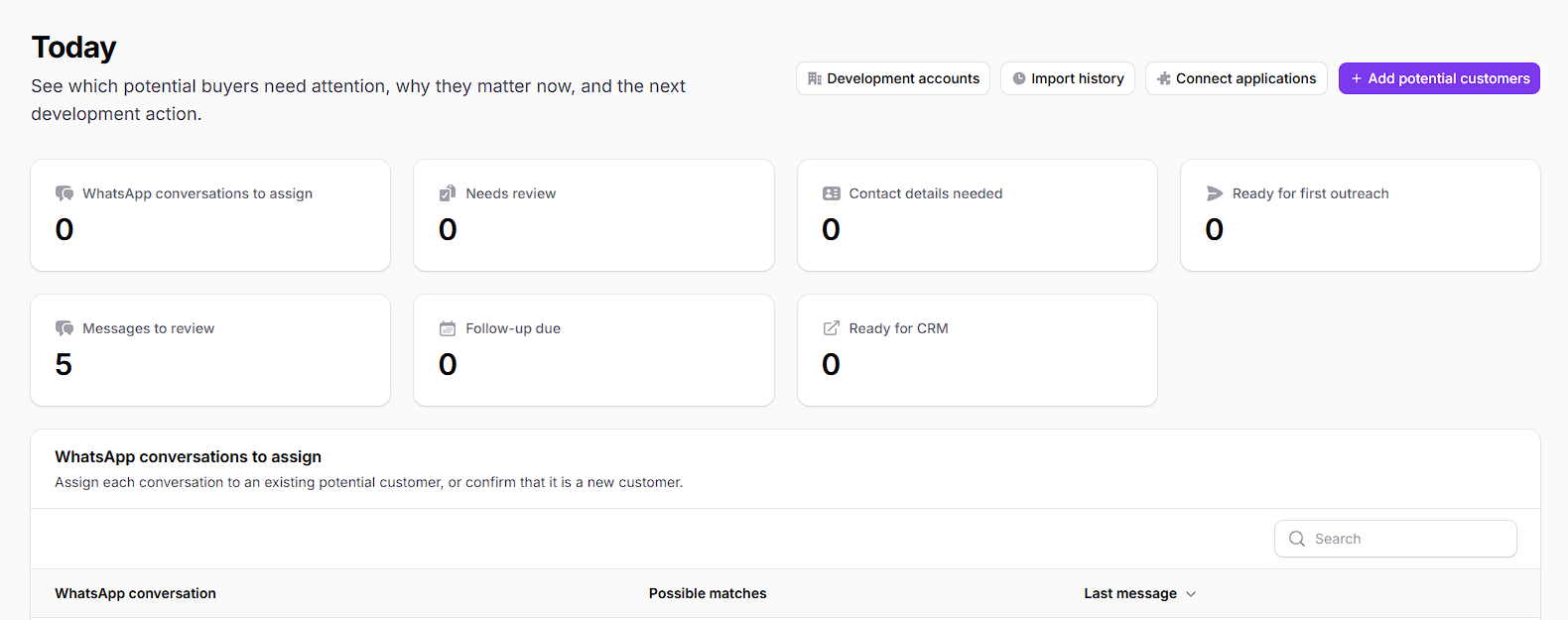
The Today workspace shows which buyer accounts need contact details, review, first outreach, reply handling, follow-up, or CRM handoff. Open an account to see its source, buyer profile, communication, and next action together.
- Import customs data or an existing lead list without losing the original source evidence.
- Review buyer details, data gaps, communication history, and sales priority in one account.
- Move qualified interest into CRM, quotation, PI, or the next confirmed follow-up action.
How TradePilot works
A Clear Path From Lead Source to Sales Action
Each buyer account keeps its source, available facts, communication, status, and next action together so the team can continue without rebuilding the record.
Step 1
Import Existing Leads
Start with customs data, an existing lead list, or a buyer conversation your team already has.
Step 2
Build the Buyer Profile
Match reliable identifiers, preserve source records, and identify useful facts, missing details, and conflicts.
Step 3
Work the Next Action
Prepare first outreach, review a reply, schedule follow-up, or clarify what information is still needed.
Step 4
Hand Off Qualified Interest
Move a ready buyer into CRM, quotation, PI preparation, or another confirmed sales step.
The connected sales record
Keep the Buyer History With the Next Action
Your team can review the source, buyer profile, real communication, current status, and next sales action together instead of reconstructing the account from spreadsheets and inboxes.
Before you start
Who TradePilot Is For and Where Human Review Still Matters
Use TradePilot to organize active sales development work while keeping customer contact, commercial commitments, and final decisions under your team’s control.
Who it is for
Built for Export Sales and Business Development Teams
TradePilot is designed for exporters, international sales teams, and business development teams that already have customs records, lead lists, referrals, exhibition contacts, CRM exports, email, or WhatsApp conversations to develop.
Important boundary
Your Team Controls Every Customer Action
TradePilot organizes sales development and prepares next steps. Your team confirms customer identity, outreach wording, prices, delivery promises, payment terms, compliance requirements, and every external action before use. It does not replace CRM, legal review, or qualified commercial judgment.
Common questions
Questions Before You Start With TradePilot
Direct answers about the lead sources TradePilot accepts, how buyer accounts are organized, and how sales work moves into CRM and deal preparation.
Ready to start
Bring One Existing Buyer List Into TradePilot
Start with customs data or a lead list your team already owns, then turn it into a prioritized sales development queue.
Start in the workspace
Build Your First Development Queue
Open TradePilot, import an existing buyer source, and see which accounts need more information, outreach, follow-up, or CRM handoff.
Want to compare access first?