
Générateur de factures pro forma
Générateur de factures pro forma
Rassemblez les informations approuvées sur le vendeur, la banque, les produits et la transaction dans un espace de travail PI unique, calculez le total de la commande, enregistrez le brouillon et exportez un PDF A4 professionnel pour l’acheteur.
Le problème métier
Une petite erreur dans une PI peut retarder le paiement, la production ou l’expédition
De nombreuses équipes export préparent encore leurs factures pro forma en copiant un ancien tableur ou document, puis en remplaçant les noms, les produits, les prix, les coordonnées bancaires et les conditions commerciales champ par champ. PI Generator regroupe les informations nécessaires à la transaction en cours et les transforme en un document enregistré ainsi qu’en un PDF téléchargeable.
Le problème métier
Les anciens fichiers contiennent d’anciennes informations
Une PI copiée peut conserver le mauvais acheteur, la mauvaise devise, le mauvais compte bancaire, la mauvaise destination, la mauvaise date de validité, les mauvaises conditions de paiement ou la mauvaise description du produit.
L’impact concret
Les totaux sont recalculés manuellement
La quantité, le prix unitaire, le fret, la remise, le sous-total et le montant final doivent tous correspondre avant que l’acheteur puisse confirmer la commande.
Avant et après
Passez de la copie d’anciens fichiers à la préparation de la transaction en cours
Remplacez les tâches manuelles répétitives par un processus plus clair qui relie l’objectif commercial, les informations de travail et la prochaine action.
Avant
Avant PI Generator
Trouvez une ancienne PI qui ressemble à la nouvelle commande. Remplacez manuellement les informations sur le vendeur, l’acheteur, la banque, les produits et la transaction. Recalculez les montants des lignes et les totaux dans un tableur distinct. Exportez le fichier et vérifiez qu’il ne reste aucune ancienne information.
Avec PI Generator
Avec PI Generator
Commencez avec les valeurs par défaut approuvées de l’entreprise et le compte de réception sélectionné. Ajoutez les informations actuelles de l’acheteur et les actifs produits par SKU. Vérifiez les quantités, prix, frais de transport, remises et totaux calculés. Enregistrez le brouillon de PI et exportez les données actuelles au format PDF A4.
Résultat commercial
Les informations approuvées sont dispersées
L’identité du vendeur, le compte de réception, les informations SKU, les Incoterms, le délai et les ports figurent souvent dans des fichiers distincts ou dépendent de la mémoire du personnel.
Document illustratif
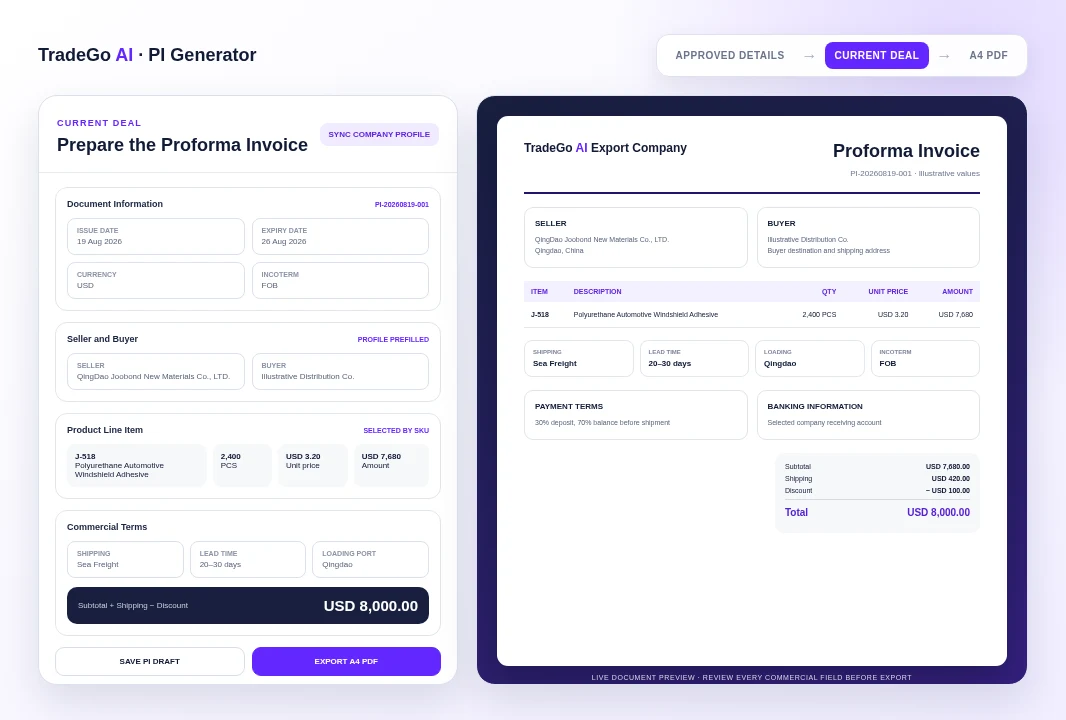
Consultez les détails de la transaction avant qu’ils ne deviennent la PI de l’acheteur
L’exemple utilise un véritable SKU d’actif produit ainsi que les mêmes options au niveau de l’entreprise prises en charge par la plateforme, puis montre comment les informations sur l’acheteur, les articles, l’expédition, les conditions de paiement et les totaux apparaissent dans le document.
Comment ça fonctionne
Quatre étapes, des détails de la transaction à une PI prête pour l’acheteur
Suivez une séquence claire, depuis les informations fournies par votre équipe jusqu’à un résultat pouvant être examiné et utilisé pour la prochaine action commerciale.
Étape 1
Synchroniser le vendeur
Chargez l’identité actuelle de l’entreprise, les options commerciales privilégiées et le compte de réception sélectionné depuis les profils d’entreprise.
Étape 2
Ajouter l’acheteur et les produits
Saisissez les informations sur l’acheteur et l’expédition, puis sélectionnez les actifs produits actifs par SKU ou ajoutez les articles requis.
Étape 3
Confirmer les conditions commerciales
Choisissez la devise, l’Incoterm, le délai, le mode d’expédition, les ports, les conditions de paiement, le fret, la remise et les notes.
Étape 4
Enregistrer et exporter
Vérifiez le récapitulatif en temps réel et l’aperçu du document, enregistrez le brouillon, puis exportez la PI actuelle au format PDF A4.
Ce que vous utilisez
Conservez dans un seul document les informations commerciales dont les acheteurs ont besoin
Utilisez les informations commerciales dont votre équipe dispose déjà, puis examinez le résultat avant de l’intégrer à des activités liées aux clients, aux marchés, aux documents ou aux campagnes.
01
Détails du document
Numéro de PI, statut du brouillon, dates d’émission et d’expiration, devise et Incoterm sélectionné.
02
Vendeur et acheteur
Coordonnées et informations sur l’entreprise des deux parties, notamment le pays de l’acheteur et l’adresse d’expédition.
03
Articles de la ligne produit
SKU, nom de l’article, description, quantité, unité, prix unitaire et montant calculé de la ligne.
04
Expédition et livraison
Mode d’expédition, délai, port de chargement, port de destination et notes supplémentaires sur l’emballage ou la validité.
Avant de commencer
Ce que PI Generator vous aide à faire et les points qui nécessitent toujours une vérification
Utilisez l’espace de travail pour organiser et préparer le travail, tout en laissant le jugement commercial final et les approbations importantes à votre équipe.
À qui s’adresse cet outil
Préparez une PI cohérente sans partir d’un ancien document
Réutilisez les informations approuvées sur le vendeur, la banque, les produits et les options commerciales. Conservez séparément les informations propres à l’acheteur pour la transaction en cours. Calculez les montants des lignes et le total final de la commande à partir des valeurs saisies. Enregistrez les dossiers de PI avec leurs articles pour pouvoir les modifier ultérieurement. Exportez un PDF A4 structuré pour vérification par l’acheteur.
Point important
La PI nécessite toujours une vérification commerciale et bancaire
PI Generator organise et calcule les informations saisies dans le document. Il n’approuve pas de manière indépendante les prix, les conditions de crédit, le traitement fiscal, la pertinence de l’Incoterm, la titularité du compte bancaire, la disponibilité des produits, la capacité de production, les frais de fret ou les exigences de conformité. Vérifiez l’acheteur, les produits, les quantités, les prix, la devise, les coordonnées bancaires, les conditions de paiement, les dates, les ports, le fret, la remise et le total final avant de partager le PDF.
Questions fréquentes
Questions à vous poser avant de créer votre première facture pro forma
PI Generator s’adresse aux équipes commerciales export et aux équipes des opérations internationales qui doivent transformer les détails confirmés d’une transaction en une facture pro forma cohérente et vérifiable, sans devoir reconstruire le document à chaque fois.
Commencez par la transaction en cours
Préparez la PI que votre acheteur pourra examiner et confirmer
Chargez les informations approuvées de l’entreprise, saisissez les informations sur l’acheteur et la commande, vérifiez chaque champ commercial et exportez le document actuel au format PDF A4 professionnel.
Choisissez votre prochaine étape
Commencez par une tâche réelle
Ouvrez l’espace de travail dès maintenant ou comparez les forfaits avant de commencer.