
PI Generator
PI Generator
Bring approved seller, bank, product, and trade details into one PI workspace, calculate the order total, save the draft, and export a professional A4 PDF for the buyer.
The Business Problem
A Small PI Error Can Delay Payment, Production, or Shipment
Many export teams still prepare proforma invoices by copying an old spreadsheet or document and replacing names, products, prices, banking details, and trade terms one field at a time. PI Generator keeps the information needed for the current deal together and turns it into a saved document and downloadable PDF.
The business problem
Old Files Carry Old Information
A copied PI can retain the wrong buyer, currency, bank account, destination, validity date, payment term, or product description.
The practical impact
Totals Are Recalculated Manually
Quantity, unit price, freight, discount, subtotal, and final amount must all agree before the buyer can confirm the order.
Before and after
Move From Copying Old Files to Preparing the Current Deal
Replace repeated manual work with a clearer process that keeps the business goal, working information, and next action connected.
Before
Before PI Generator
Find an old PI that looks close to the new order. Replace seller, buyer, bank, product, and trade details manually. Recalculate line amounts and totals in a separate spreadsheet. Export the file and check whether any old information remains.
With PI Generator
With PI Generator
Start with approved company defaults and the selected receiving account. Add current buyer details and Product Assets by SKU. Review calculated quantities, prices, freight, discount, and total. Save the PI draft and export the current data as an A4 PDF.
Business outcome
Approved Details Are Scattered
Seller identity, receiving account, SKU information, Incoterms, lead time, and ports often live in separate files or depend on staff memory.
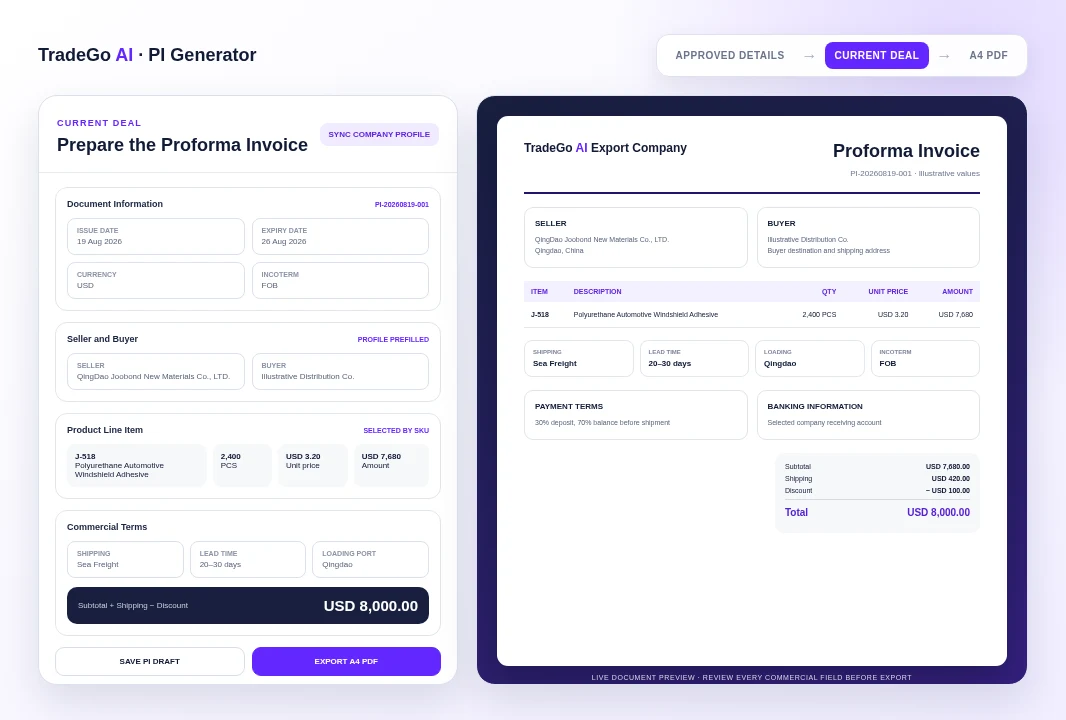
Illustrative Document
See the Deal Details Before They Become the Buyer’s PI
The example uses a real Product Asset SKU and the same company-level options supported by the platform, then shows how buyer information, line items, shipping, payment terms, and totals appear in the document.
How it works
Four Steps From Deal Details to a Buyer-Ready PI
Follow a clear sequence from the information your team provides to a result that can be reviewed and used in the next business action.
Step 1
Sync the Seller
Load the current company identity, preferred trade options, and selected receiving account from Company Profiles.
Step 2
Add Buyer and Products
Enter the buyer and shipping details, then select active Product Assets by SKU or add the required line items.
Step 3
Confirm Commercial Terms
Choose currency, Incoterm, lead time, shipping method, ports, payment terms, freight, discount, and notes.
Step 4
Save and Export
Check the live summary and document preview, save the draft, then export the current PI as an A4 PDF.
What you work with
Keep the Commercial Information Buyers Need in One Document
Use the business information your team already has, then review the result before it moves into customer, market, document, or campaign work.
01
Document Details
PI number, draft status, issue and expiry dates, currency, and selected Incoterm.
02
Seller and Buyer
Company and contact details for both parties, including buyer country and shipping address.
03
Product Line Items
SKU, item name, description, quantity, unit, unit price, and calculated line amount.
04
Shipping and Delivery
Shipping method, lead time, port of loading, port of destination, and additional packing or validity notes.
Before you start
What PI Generator Helps You Do and Where Review Still Matters
Use the workspace to organize and prepare the work, while keeping final business judgment and important approvals with your team.
Who it is for
Prepare a Consistent PI Without Starting From an Old Document
Reuse approved seller, bank, product, and trade-option information. Keep buyer-specific details separate for the current transaction. Calculate line amounts and the final order total from entered values. Save PI records with their line items for later editing. Export a structured A4 PDF for buyer review.
Important boundary
The PI Still Requires Commercial and Banking Review
PI Generator organizes and calculates the information entered into the document. It does not independently approve prices, credit terms, tax treatment, Incoterm suitability, bank-account ownership, product availability, production capacity, freight charges, or compliance requirements. Verify the buyer, products, quantities, prices, currency, bank details, payment terms, dates, ports, freight, discount, and final total before sharing the PDF.
Common Questions
Questions Before You Create Your First Proforma Invoice
PI Generator is for export sales and trade operations teams that need to turn confirmed deal details into a consistent, reviewable proforma invoice without repeatedly rebuilding the document.
Start With the Current Deal
Prepare the PI Your Buyer Can Review and Confirm
Load approved company information, enter the buyer and order details, check every commercial field, and export the current document as a professional A4 PDF.
Choose your next step
Start With One Real Task
Open the workspace now, or compare plans before you begin.