
Product Catalog Generator
Product Catalog Generator
Turn your existing product specifications, images, selling points, and company details into a consistent catalog your sales team can review, export, and send to buyers.
The Business Problem
Catalog Production Slows Down When Product Information Lives Everywhere
Export teams often rebuild the same catalog from spreadsheets, image folders, old PDFs, product pages, and company documents. Every revision creates another round of copying, formatting, checking, and sending files between sales and design. Product Catalog Generator keeps the products, company identity, catalog structure, preview, and exported document in one controlled workflow.
The business problem
Specifications Are Copied by Hand
Product names, models, parameters, applications, and commercial details are repeatedly moved between files, increasing inconsistency and missing data.
The practical impact
Every Catalog Looks Different
Logos, colors, page order, product images, and contact information drift when each salesperson starts from a different document.
Before and after
Move From Scattered Product Files to a Repeatable Catalog Workflow
Replace repeated manual work with a clearer process that keeps the business goal, working information, and next action connected.
Before
Before Product Catalog Generator
Collect specifications, images, and company details again for every catalog. Copy product facts into a new document and adjust the layout manually. Send drafts back and forth without a clear completeness check. Lose track of which PDF is current after each revision.
With Product Catalog Generator
With Product Catalog Generator
Select current products from the library or add them manually. Reuse approved company identity, contact details, and brand colors. Review the page structure and resolve preflight issues before export. Save drafts and exported versions in the catalog history.
Business outcome
Small Updates Take Too Long
Replacing one image or changing one parameter can trigger a full design cycle even when the buyer only needs an accurate, current PDF.
Illustrative Output
See the Complete Page Plan Before You Export the PDF
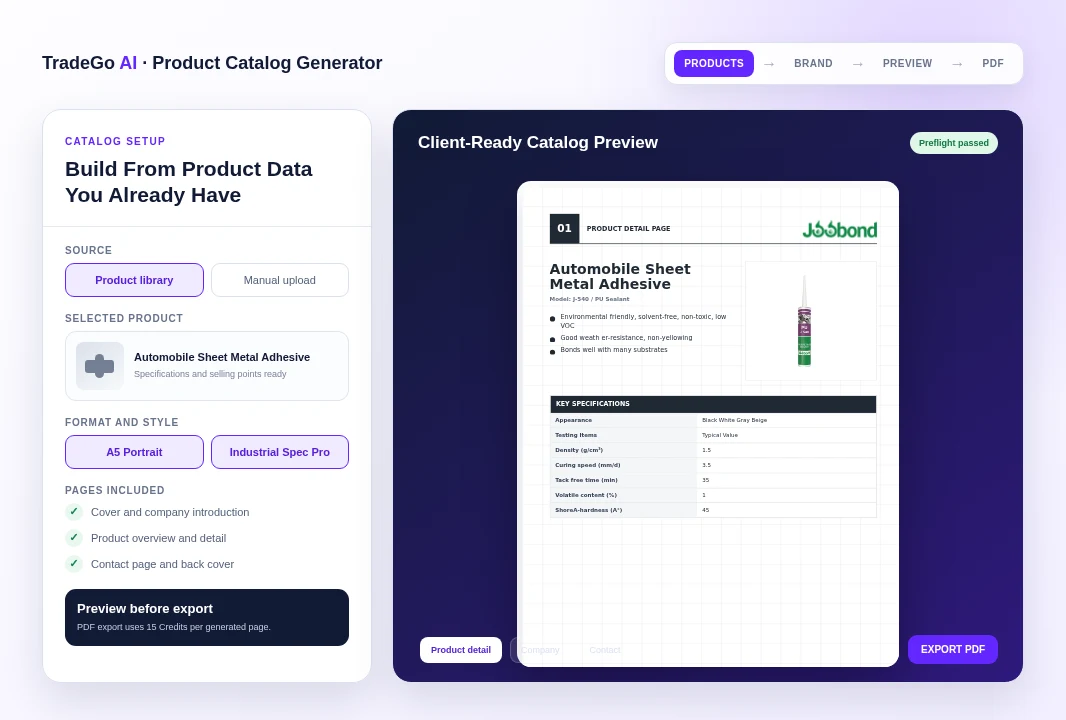
A catalog can combine company information with product overview and detail pages, structured specifications, selling points, applications, contact information, and a consistent brand treatment.
How it works
Four Steps From Product Data to a Buyer-Ready PDF
Follow a clear sequence from the information your team provides to a result that can be reviewed and used in the next business action.
Step 1
Choose the Products
Select up to 10 products from your product library, enter products manually, or combine both sources.
Step 2
Set the Catalog Style
Choose the format, template, visual style, output language, page modules, images, and brand details.
Step 3
Review Every Page
Inspect the cover, company pages, product pages, specifications, contact information, and preflight findings.
Step 4
Export and Reuse
Lock the approved preview, export the PDF, download it, and keep the saved version available in history.
What you work with
Start With the Product and Company Information Your Team Already Uses
Use the business information your team already has, then review the result before it moves into customer, market, document, or campaign work.
01
Product Details
Names, models, categories, descriptions, selling points, applications, specifications, MOQ, lead time, and packaging where relevant.
02
Product Images
Select current product images from the library or upload replacements for the catalog draft.
03
Company Identity
Reuse the company name, logo, introduction, colors, website, email, phone number, and other approved contact information.
04
Catalog Decisions
Choose the format, template, language, page order, included sections, and final information buyers should see.
Before you start
What Product Catalog Generator Helps You Do and Where Review Still Matters
Use the workspace to organize and prepare the work, while keeping final business judgment and important approvals with your team.
Who it is for
Prepare Consistent Sales Catalogs With Less Rework
Reuse products and company information already stored in TradeGo AI. Build cover, company, overview, product detail, contact, and back-cover pages. Edit images, selling points, applications, specifications, and commercial details. Check the draft for missing or unsuitable content before export. Save drafts, exported PDFs, and document versions in one place.
Important boundary
Your Team Confirms Every Claim Before Sending
The catalog is only as accurate as the product, company, pricing, compliance, and contact information supplied to it. Generated structure and wording do not replace technical, legal, or commercial review. Confirm specifications, images, certifications, availability, MOQ, lead time, packaging, and all buyer-facing claims before exporting or sharing the document.
Common Questions
Questions Before You Create Your First Product Catalog
Product Catalog Generator is designed for export sales and product teams that need an accurate, repeatable way to turn current product information into client-ready PDF catalogs.
Turn Current Product Data Into the Next Sales Catalog
Build the Draft, Check Every Page, Then Export With Confidence
Select the products, reuse approved company details, choose the catalog structure, and review the complete document before export. PDF export uses 15 Credits per generated page. Sign in to check current availability and your Credit balance, or review pricing and plans.
Choose your next step
Start With One Real Task
Open the workspace now, or compare plans before you begin.