
Enterprise Video Script Compiler
Enterprise Video Script Compiler
Describe the video you need, reference the right company or product material, and build an editable master script, scene-by-scene shot plan, and platform-specific prompt package.
The Business Problem
A Good Video Idea Is Not Yet a Production Plan
Teams often start with product notes, company files, and a general message, then ask a videographer or generation platform to decide the story, shots, timing, evidence, and missing materials. The result is repeated rewriting, inconsistent claims, unusable prompts, and footage that does not support the purchasing message.
The business problem
The Brief Is Too Vague to Shoot
“Make a factory video” does not tell the production team which buyer concern to address, which proof to show, or what action should follow.
The practical impact
Every Platform Needs Rework
A master idea still needs model-specific duration, aspect ratio, input mode, reference-material roles, and operating instructions.
Before and after
Move From a Loose Request to a Production Team Hand-Off
Replace repeated manual work with a clearer process that keeps the business goal, working information, and next action connected.
Before
Before the Video Script Compiler
Send scattered product notes and files to a writer or production team. Rewrite the story separately for every video platform. Discover missing footage and reference images during production. Lose the relationship between approved facts, voiceover, visuals, and CTA.
With Enterprise Video Script Compiler
With the Video Script Compiler
Start with one B2B video task and the relevant business material. Review an editable content angle, hook, master script, and shot plan. See reference requirements and missing assets before production begins. Compile the approved shots into copy-ready packages for the selected platform.
Business outcome
Missing Assets Are Found Too Late
Product photos, factory footage, test evidence, logos, customer authorization, or technical diagrams are often discovered only after production begins.
Recorded Project
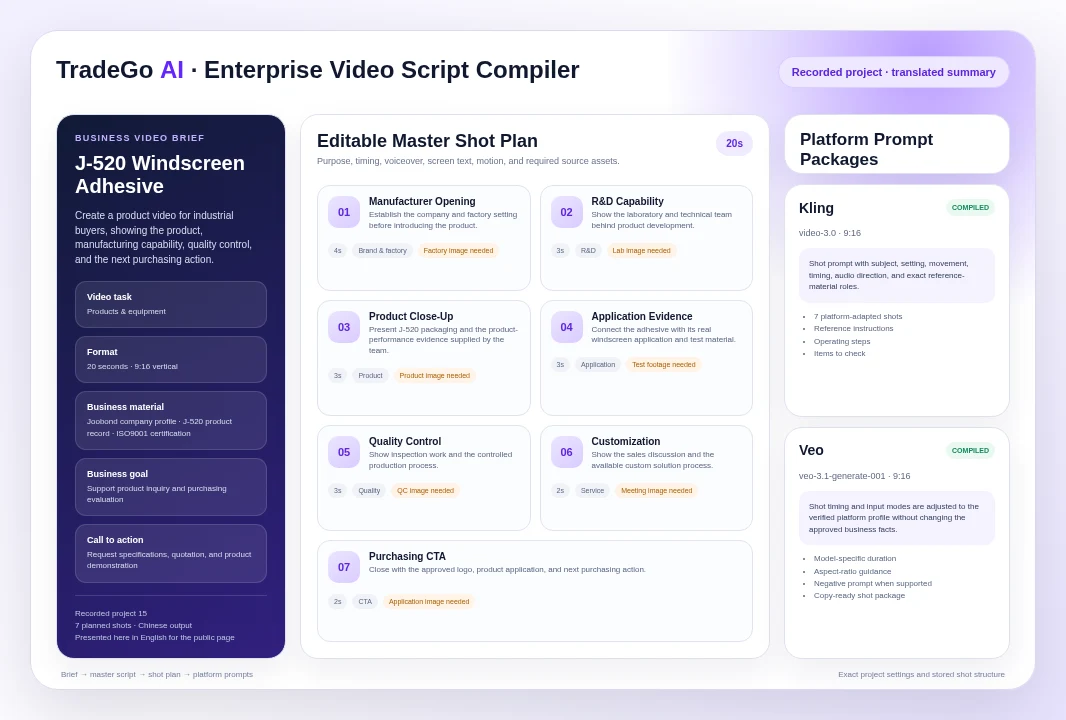
A 20-Second Product Brief Became Seven Planned Shots
A completed Chinese-language project used an existing Joobond company profile and J-520 product record to prepare a vertical product video for industrial buyers. The project was set to 20 seconds and a 9:16 aspect ratio.
How it works
Four Steps From Business Request to Platform Prompt Package
Follow a clear sequence from the information your team provides to a result that can be reviewed and used in the next business action.
Step 1
Define the Video Job
Choose the task, duration, aspect ratio, and output language, then describe the business video you want in one sentence.
Step 2
Reference the Right Facts
Select a company profile or product record and add only the evidence relevant to the video, including any claims that must not be used.
Step 3
Review the Master Plan
Edit the content angle, hook, script sections, individual shots, timing, voiceover, screen text, motion, and required source assets.
Step 4
Compile for Production
Select the video platform and receive model-aware shot prompts, reference-material instructions, operating steps, and items to check.
What you work with
Plan More Than Product Promotions
Use the business information your team already has, then review the result before it moves into customer, market, document, or campaign work.
01
Products and Equipment
Show the product in use, its purchasing value, supporting evidence, and the next inquiry action.
02
Solutions
Explain the customer problem, solution path, and business value that can be supported by evidence.
03
Company and Factory
Structure real manufacturing, R&D, quality, capacity, and delivery evidence for overseas buyers.
04
Customer Case Studies
Turn authorized customer background, implementation, and verified results into a controlled case story.
Before you start
What Enterprise Video Script Compiler Helps You Do and Where Review Still Matters
Use the workspace to organize and prepare the work, while keeping final business judgment and important approvals with your team.
Who it is for
Keep Business Facts, Story, Shots, and Platform Instructions Connected
Use approved company and product records instead of starting from an empty prompt. Match the story to the buyer, business goal, target market, channel, and CTA. Plan each shot with its purpose, timing, motion, voiceover, text, and source requirements. Identify missing reference material before production or generation starts. Adapt the approved shot plan for Kling, Veo, Runway, Seedance, Hailuo, Firefly, Luma, and HeyGen workflows.
Important boundary
It Prepares the Production Plan; It Does Not Produce the Finished Video
The tool creates scripts, shots, prompts, and operating instructions. It does not shoot footage, generate the final video, edit clips, add licensed music, secure model or customer releases, or publish the result. Confirm every product claim, certification, result, logo, customer identity, third-party mark, reference asset, platform setting, and production right before use. Platform capabilities can change, so review the displayed platform guidance when compiling.
Common Questions
Questions Before You Build a B2B Video Script
Enterprise Video Script Compiler is for international sales, marketing, product, and production teams that need to turn verified company and product material into a clear video story, a practical shot plan, and platform-ready production instructions.
Start With One Real Video Job
Give Your Production Team More Than a Loose Brief
Bring the business goal and approved source material, then review a complete script and shot plan before filming, generation, or editing begins.
Choose your next step
Start With One Real Task
Open the workspace now, or compare plans before you begin.