
Lead Ads Enricher
Lead Ads Enricher
Bring Google Sheet ad leads into one workspace, see which companies are worth contacting first, and prepare the next message without sorting every row by hand.
The Business Problem
An Ad Form Submission Is Not Yet a Sales Opportunity
Lead forms often collect just enough information to create a spreadsheet row, but not enough to show whether the company is a real buyer, whether the contact matters, or what your team should say next. Lead Ads Enricher turns that raw list into a practical sales workspace so your team can spend time on stronger opportunities instead of checking every lead from the beginning.
The business problem
Too Little Buyer Information
A name, email, and phone number rarely explain the company, market fit, or likely buying need.
The practical impact
Every Lead Looks Equally Urgent
Without a consistent way to compare fit and evidence, good prospects disappear inside a long spreadsheet.
Before and after
Move From a Raw Lead Sheet to a Clear Follow-Up Queue
Replace repeated manual work with a clearer process that keeps the business goal, working information, and next action connected.
Before
Before Lead Ads Enricher
Open every website and social profile one by one. Judge lead quality from incomplete form answers. Treat strong buyers and weak inquiries the same. Write each first message from a blank page.
With Lead Ads Enricher
With Lead Ads Enricher
Review leads in one qualified sales workspace. Compare company fit and supporting evidence. Prioritize qualified, follow-up, and review queues. Prepare a relevant email or WhatsApp opener.
Business outcome
Follow-Up Starts Too Late
Sales teams lose momentum while researching companies and rewriting the first email or WhatsApp message.
Illustrative Output
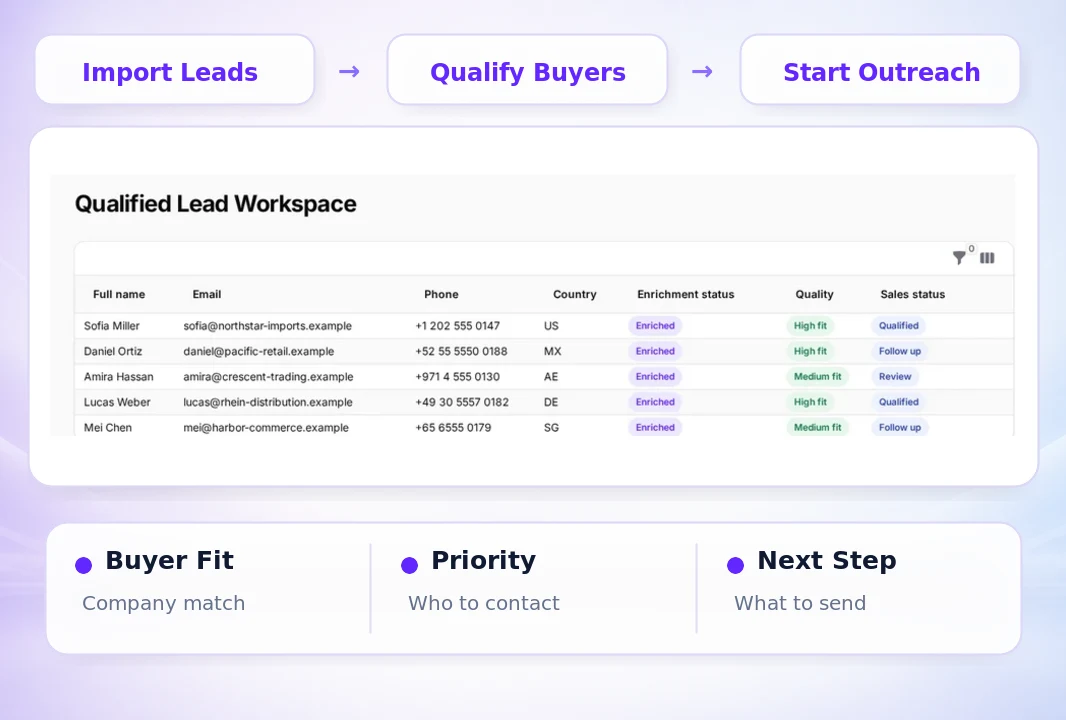
Know Why a Lead Deserves Attention and What to Do Next
Each qualified lead connects the submitted details with company evidence, buyer fit, contact priority, and a recommended next sales action.
How it works
Four Steps From Ad Lead to Sales Next Action
Follow a clear sequence from the information your team provides to a result that can be reviewed and used in the next business action.
Step 1
Connect the Lead Sheet
Bring in the Google Sheet that receives your advertising lead-form submissions.
Step 2
Choose the Batch
Select leads by date, row, or quantity so your team can work through the list in manageable groups.
Step 3
Review Buyer Fit
Compare company evidence, products, target markets, lead answers, and contact details.
Step 4
Prepare Follow-Up
Draft the first email or WhatsApp message, then export the result or move qualified leads into CRM.
What you work with
Qualify Leads With the Business Information Your Team Already Has
Use the business information your team already has, then review the result before it moves into customer, market, document, or campaign work.
01
Google Sheet Leads
Use the names, emails, phone numbers, countries, companies, and campaign answers already captured by your form.
02
Your Company and Products
Compare each lead with your approved company details, product information, and sales priorities.
03
Target Market Rules
Use the countries, buyer types, industries, roles, and qualification signals that matter to your campaign.
04
Sales Channels
Prepare the next action for email, WhatsApp, CSV export, or CRM handoff.
Before you start
What Lead Ads Enricher Helps You Do and Where Review Still Matters
Use the workspace to organize and prepare the work, while keeping final business judgment and important approvals with your team.
Who it is for
Turn More Lead Data Into Useful Sales Work
Organize imported leads and remove repeated records. Review company fit, buyer evidence, and lead quality. See which leads are qualified, need follow-up, or require review. Prepare first-touch email and WhatsApp messages. Export results and hand stronger opportunities to CRM.
Important boundary
Your Team Keeps Control of Qualification and Contact
Lead Ads Enricher organizes available information and supporting evidence. Some companies or contacts may not have enough reliable public information for a confident conclusion. Review the source evidence, confirm contact details, and approve every message before sending it. Your team decides which leads to contact, export, or move into CRM.
Common Questions
Questions Before You Qualify Your First Lead Batch
Lead Ads Enricher is designed for export sales, business development, and marketing teams that receive B2B inquiries through lead forms and need a clearer way to prioritize follow-up.
Start With the Leads You Already Have
Turn the Next Lead Sheet Into a Prioritized Sales Queue
Connect your Google Sheet, review buyer fit and evidence, and prepare the next message for the leads worth pursuing. The current product uses 3000 Credits for 30 days and supports up to 200 leads. Sign in to view your available Credits, or review pricing and plans.
Choose your next step
Start With One Real Task
Open the workspace now, or compare plans before you begin.