
Email Reply Assistant
Email Reply Assistant
Open a buyer email, prepare a professional reply using approved company, product, and sales information, then review it before saving a draft or sending it from your connected mailbox.
The Business Problem
Slow or Inconsistent Replies Can Cost Export Teams Real Opportunities
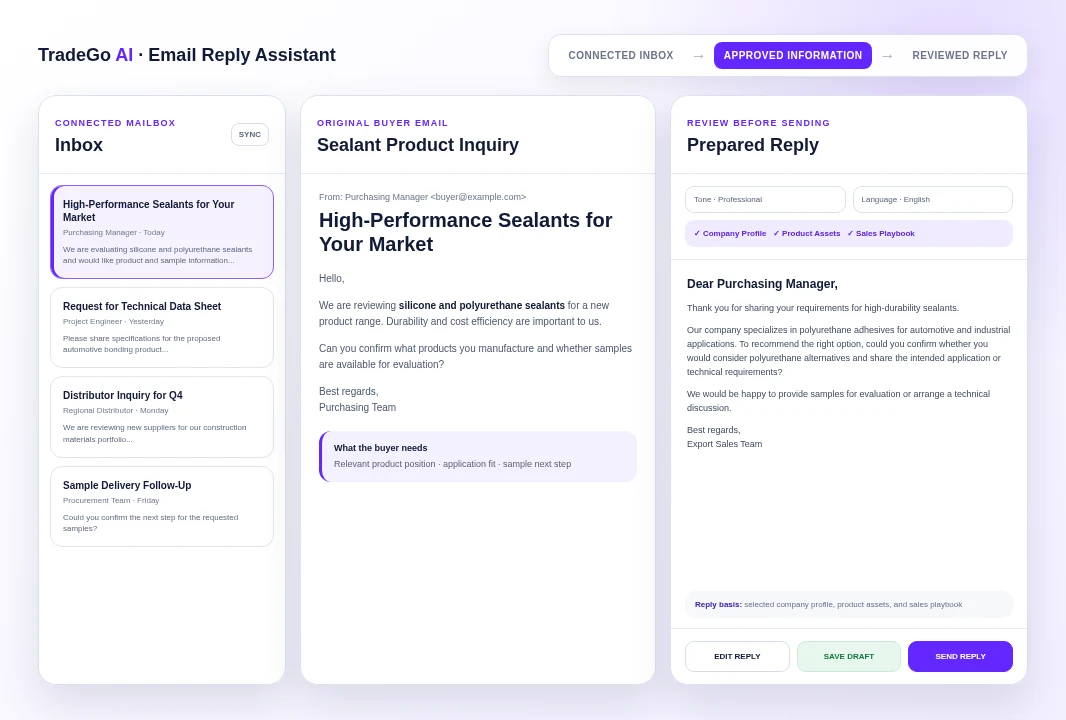
International buyer emails often require more than a quick thank-you. Sales teams need to identify the request, confirm the right product information, answer in the buyer’s language, and propose a useful next step. Email Reply Assistant keeps the incoming message, approved business information, reply draft, and mailbox action in one working view.
The business problem
Important Inquiries Wait Too Long
When salespeople must search across inboxes, product files, and old messages, a qualified buyer may wait while a competitor replies first.
The practical impact
Product Details Become Inconsistent
Manual replies can reuse outdated specifications, incomplete company information, or promises that do not match the approved sales position.
Before and after
Move From a Scattered Reply Process to One Reviewable Workspace
Replace repeated manual work with a clearer process that keeps the business goal, working information, and next action connected.
Before
Before Email Reply Assistant
Copy the buyer’s email into a separate writing tool. Search folders and old messages for product and company facts. Rewrite the same introduction and closing for each inquiry. Copy the finished reply back into the mailbox and rebuild the thread.
With Email Reply Assistant
With Email Reply Assistant
Select a message from a connected Gmail, Outlook, or Zoho inbox. Choose the tone, reply language, and approved knowledge sources. Review and edit the generated reply beside the original email. Save it as a mailbox draft or send it after confirmation.
Business outcome
The Next Step Is Easy to Miss
A polite reply may still fail to ask for application details, quantity, destination, technical requirements, or another fact needed to move the opportunity forward.
Recorded Platform Output
Turn a Product Inquiry Into a Reviewable Sales Reply
In a completed platform run, an inquiry about silicone and polyurethane sealants was answered with the company’s relevant polyurethane product position, a clarification question, and a sample-oriented next step.
How it works
Four Steps From Buyer Email to a Ready-to-Review Reply
Follow a clear sequence from the information your team provides to a result that can be reviewed and used in the next business action.
Step 1
Connect the Mailbox
Use a connected Gmail, Outlook, or Zoho Mail account and sync the inbox messages available to your account.
Step 2
Select the Buyer Email
Open the message so the sender, subject, and full email content appear in the reply workspace.
Step 3
Prepare the Reply
Choose a tone and language, then add selected company profiles, product assets, or sales playbooks when relevant.
Step 4
Review and Act
Edit the generated text, verify every business detail, then save a draft or send the reply through the connected mailbox.
What you work with
Choose the Information and Reply Style for Each Conversation
Use the business information your team already has, then review the result before it moves into customer, market, document, or campaign work.
01
Connected Mailbox
Select an available Gmail, Outlook, or Zoho Mail connection and sync the messages you need to answer.
02
Reply Tone
Choose Professional, Friendly, Warm, or Confident based on the buyer and stage of the conversation.
03
Reply Language
Prepare the draft in English, Chinese, Spanish, French, Russian, Arabic, Portuguese, Japanese, or Korean.
04
Company Profiles
Select the exact company profile whose approved identity and business information should support the reply.
Before you start
What Email Reply Assistant Helps You Do and Where Review Still Matters
Use the workspace to organize and prepare the work, while keeping final business judgment and important approvals with your team.
Who it is for
Respond Faster Without Separating the Email From the Sales Information
Work from the original message inside a connected-mailbox workflow. Prepare replies in the buyer’s preferred language and an appropriate tone. Use selected company, product, and sales information instead of relying on memory. Edit the reply before it becomes a saved mailbox draft or sent message. Keep the response attached to the existing thread when the mailbox provides it.
Important boundary
Your Team Still Owns Every Promise Made to the Buyer
The assistant prepares a draft; it does not verify inventory, production capacity, price, lead time, certification validity, freight, legal terms, or payment conditions unless accurate approved information is supplied and reviewed. Check names, addresses, specifications, quantities, commercial terms, attachments, and the requested next step before saving or sending. Do not send confidential information simply because it appears in a selected source.
Common Questions
Questions Before You Reply to Your First Buyer Email
Email Reply Assistant is for export sales and customer-facing teams that want to prepare buyer replies faster while keeping approved company and product information close to the conversation.
Start With the Buyer Email
Prepare the Reply While the Opportunity Is Still Active
Connect the mailbox, select the inquiry, choose the approved information, and review the draft before it reaches the buyer. Each generated reply currently costs 1 Credit.
Choose your next step
Start With One Real Task
Open the workspace now, or compare plans before you begin.