
Social Copy Generator
Social Copy Generator
Bring a request, link, image, file, or source notes into one campaign workspace, then create distinct social copy for every selected platform and output language.
The Business Problem
Copying the Same Post Across Every Channel Weakens the Message
A buyer-focused LinkedIn post, an Instagram caption, and a YouTube description do not need the same opening, length, structure, CTA, or hashtags. Social Copy Generator keeps the verified campaign facts consistent while adapting the final copy to how each selected platform is actually used.
The business problem
Every Platform Gets the Same Draft
Teams often shorten one master post instead of changing the hook, information order, CTA, and hashtag use for each channel.
The practical impact
Product Claims Drift During Rewriting
Manual variations can introduce unsupported specifications, guarantees, certifications, capacity figures, or delivery promises.
Before and after
Move From Rewriting One Post Repeatedly to a Managed Copy Matrix
Replace repeated manual work with a clearer process that keeps the business goal, working information, and next action connected.
Before
Before Social Copy Generator
Write one generic post and manually resize it for every channel. Repeat product facts, audience notes, tone, CTA, and restricted words in separate documents. Translate each version without a clear platform-language relationship. Search messages and spreadsheets for the latest approved copy.
With Social Copy Generator
With Social Copy Generator
Build one campaign brief from requests, links, notes, images, and files. Select the campaign type, platforms, and output languages together. Receive one platform-native result for every selected platform-language pair. Edit, copy, review, and reopen saved campaign batches from the workspace.
Business outcome
Multilingual Output Becomes a Spreadsheet
As platforms and languages increase, teams lose track of which copy belongs to which audience, campaign, and final approved version.
Recorded Campaign Output
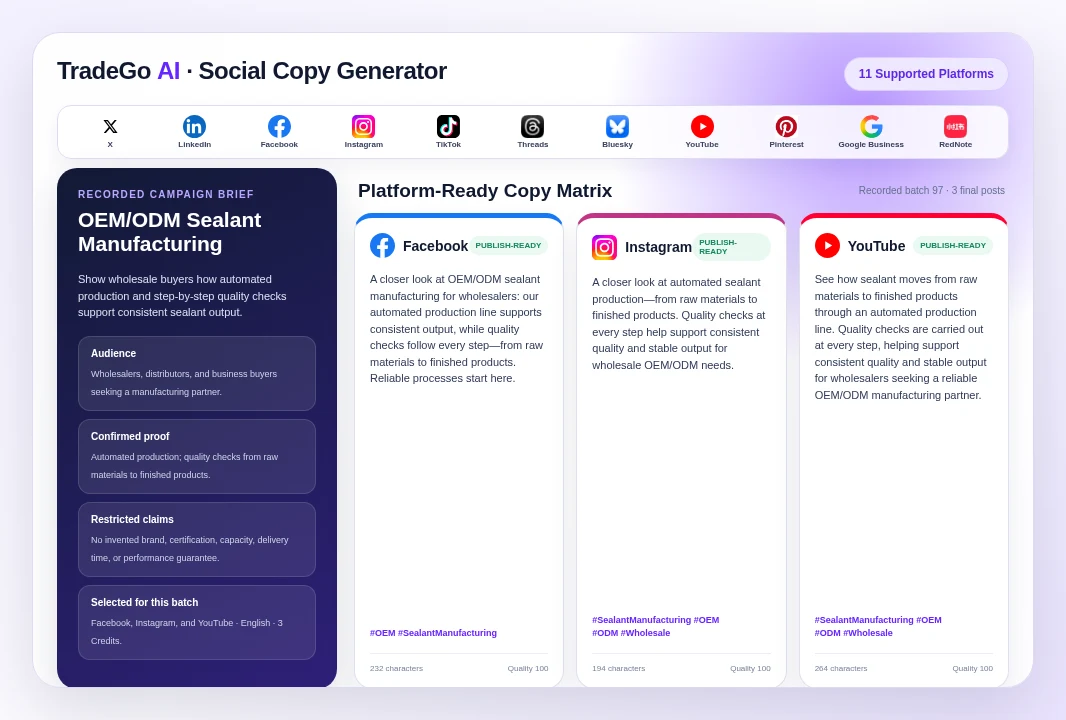
One Factory Brief, Three Different Platform Posts
A completed campaign started with a short OEM/ODM sealant manufacturing brief for wholesalers. The confirmed facts were an automated production line, consistent output, and quality checks from raw materials to finished products.
How it works
Four Steps From Source Material to Final Social Copy
Follow a clear sequence from the information your team provides to a result that can be reviewed and used in the next business action.
Step 1
Bring the Campaign Material
Describe the task, add public links or source notes, and upload supporting images or files when they contain useful campaign information.
Step 2
Confirm the Campaign Brief
Review the product, selling points, goal, audience, pain points, market, tone, CTA direction, emoji policy, and restricted words.
Step 3
Choose the Output Matrix
Select the campaign type, target platforms, and output languages. The workspace shows the scope before generation.
Step 4
Review the Final Copy
Switch between platform and language results, edit the body, CTA, and allowed hashtags, then copy or reopen the saved campaign later.
What you work with
Choose the Content Job Before the Tool Writes the Post
Use the business information your team already has, then review the result before it moves into customer, market, document, or campaign work.
01
Products and Offers
General posts, product launches, promotions, paid social ads, and local business updates.
02
Education and Engagement
How-to content, community prompts, thought leadership, and short-form video captions.
03
Trust and Brand
Brand stories, customer testimonials, influencer-style captions, and employer-brand content.
04
Events
Event announcements with the date, location, attendee value, and the right registration or attendance action.
Before you start
What Social Copy Generator Helps You Do and Where Review Still Matters
Use the workspace to organize and prepare the work, while keeping final business judgment and important approvals with your team.
Who it is for
Keep the Facts Consistent While the Platform Treatment Changes
Extract usable campaign information from requests, links, notes, images, and files. Define the audience, message, proof points, CTA, tone, and content restrictions once. Adapt length, hook, structure, CTA, and hashtag policy for each selected platform. Create and save a platform-language copy matrix inside the current team workspace. Edit the final body, CTA, and hashtags before copying or publishing elsewhere.
Important boundary
Every Post Still Needs Brand, Legal, and Market Review
The tool creates copy from the campaign evidence and instructions provided. It does not independently verify product claims, certifications, prices, inventory, delivery times, regulatory compliance, testimonial permissions, image rights, promotion terms, or platform advertising policies. Review the source facts, localized wording, hashtags, CTA, dates, offer conditions, and any regulated or comparative claim before publishing.
Common Questions
Questions Before You Generate a Social Copy Matrix
Social Copy Generator is for export sales, marketing, and content teams that need to turn the same verified product or campaign information into different platform-ready posts without losing control of claims, tone, CTA, or language.
Start With One Real Campaign
Create the Right Copy for Every Channel You Plan to Use
Bring your product facts and campaign goal, choose the platforms and languages, then review a complete copy matrix before publishing.
Choose your next step
Start With One Real Task
Open the workspace now, or compare plans before you begin.