
B2B Product Main Image Studio
B2B Product Main Image Studio
Prepare white-background, application, detail, selling-point, quality, and factory images while keeping the real product—not an invented substitute—at the center of every result.
The Business Problem
Generic Product Photos Make Good Products Harder to Understand and Trust
Many export teams have a usable product photo but not the full image set buyers expect across marketplaces, catalogs, websites, quotations, and sales follow-up. Traditional reshoots take time, while generic image generation can alter the product itself. B2B Product Main Image Studio plans each image around the real uploaded product and the business purpose you select.
The business problem
One Photo Cannot Explain Every Use
A white-background image identifies the product, but it may not show installation, scale, functional details, or credible operating context.
The practical impact
Repeated Photography Slows Sales
Every new marketplace, catalog, campaign, or buyer request can create another shoot, edit, approval, and file-delivery cycle.
Before and after
Move From One Isolated Photo to a Purpose-Built B2B Image Set
Replace repeated manual work with a clearer process that keeps the business goal, working information, and next action connected.
Before
Before Main Image Studio
Reuse the same plain product photo in every channel. Brief photographers or designers separately for each image need. Wait for repeated revisions before sales can use the images. Risk receiving attractive visuals that no longer match the product.
With B2B Product Main Image Studio
With Main Image Studio
Start with the real product photo, product name, and approved selling points. Choose the exact mix of 1–6 buyer-facing images you need. Review each delivered image and download only usable results. Regenerate or continue editing a selected image when needed.
Business outcome
Creative Images Can Change the Product
When packaging text, interfaces, quantity, materials, or structure are altered, an attractive image can become unusable or misleading.
Real Platform Output
Build Different Buyer-Facing Images From the Same Real Product
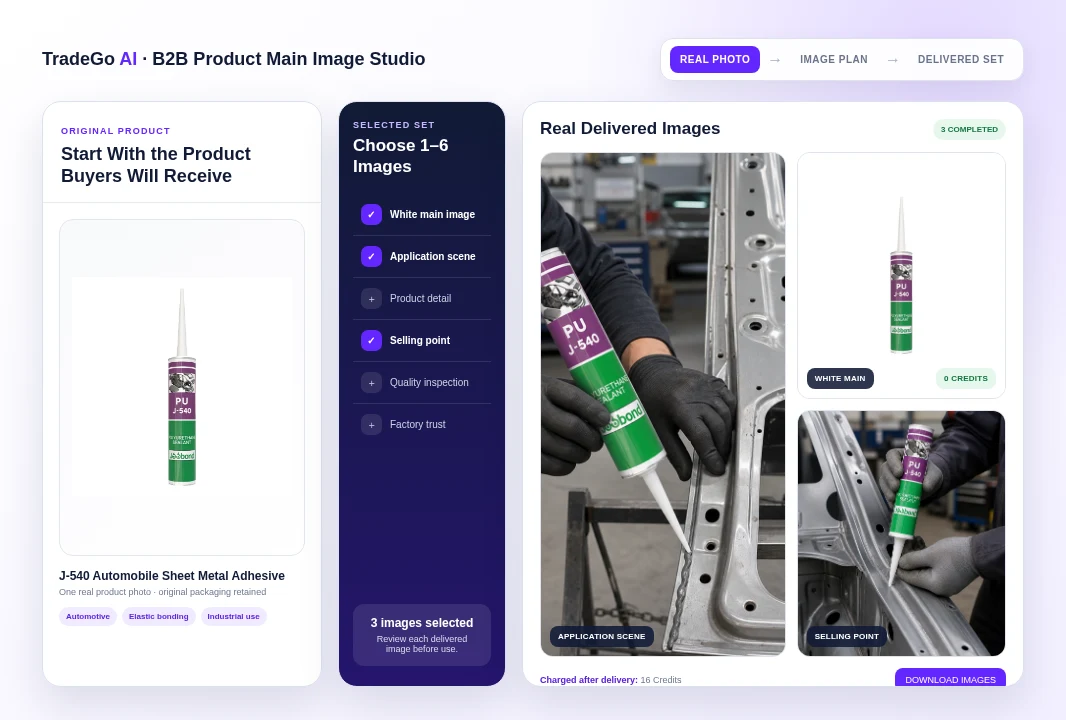
The hero visual above uses one real J-540 sealant photo and three images actually delivered by the platform: a standard white main image, an application scene, and a selling-point image.
How it works
Four Steps From a Real Product Photo to Downloadable Sales Images
Follow a clear sequence from the information your team provides to a result that can be reviewed and used in the next business action.
Step 1
Upload the Real Product
Add one clear JPG, PNG, or WebP image, the product name, and one approved selling point per line.
Step 2
Choose the Image Set
Select quantities across six image types, with a total of 1–6 images for the project.
Step 3
Review the Deliveries
Inspect the product, packaging, scene, details, and submitted selling points in every completed image.
Step 4
Download or Refine
Download completed images, regenerate a selected result, or open its canvas for further supported edits.
What you work with
Build the Set Around the Buyer Question Each Image Should Answer
Use the business information your team already has, then review the result before it moves into customer, market, document, or campaign work.
01
White Main Image
Present the unchanged product proportionally on a clean square white canvas.
02
Application Scene
Show a credible use, installation, or operating relationship involving the real product.
03
Product Detail
Focus on relevant material, structure, interface, functional end, or application detail.
04
Selling-Point Image
Express only the selling points your team provided through credible visual evidence.
Before you start
What B2B Product Main Image Studio Helps You Do and Where Review Still Matters
Use the workspace to organize and prepare the work, while keeping final business judgment and important approvals with your team.
Who it is for
Create More Useful B2B Product Images With Less Production Work
Plan a mixed image set from one real product photo. Create clean listing images and credible business-use scenes. Keep each image tied to a defined buyer-facing purpose. Review project status, delivered images, and settled Credits. Download, regenerate, or refine supported completed images.
Important boundary
Every Image Still Requires Product Review
The studio is designed to preserve the real product, but generated images can still contain errors. Check packaging text, logos, interfaces, materials, dimensions, quantity, shadows, physical relationships, background details, and every visible claim. Do not treat a generated inspection, factory, certification, performance, or application scene as factual evidence unless it accurately reflects your real product and operations.
Common Questions
Questions Before You Create Your First B2B Product Image Set
B2B Product Main Image Studio is for export sales, product, and marketing teams that have a real product photo and need more useful buyer-facing images without repeating a full photo-production cycle.
Start With the Real Product
Create the Images Your Buyers Need to Understand It
Upload one clear product photo, choose the exact image mix, and review every delivered result before using it in a catalog, website, quotation, marketplace, or sales conversation. The white main image currently costs 0 Credits; other delivered images cost 8 Credits each.
Choose your next step
Start With One Real Task
Open the workspace now, or compare plans before you begin.